Hyprland Rice + AI Chatbot
Arch Linux Wayland rice with an embedded local AI assistant wired into the window manager
2024personal rice
HyprlandArch LinuxWaylandWaybarEWWPythonOllamaShell
The Same Instinct, Different Surface
I keep returning to the same starting point: look at the default, ask whether it is actually optimal for my situation, and do the work to replace it when it is not. I did it with my keyboard layout — X-Type replaced QWERTY because the default layout was not designed for the way I type. I did it with my development tooling — ConfigPilot exists because editor configuration drift is real and no one had solved it properly. In 2024, I applied the same logic to the entire operating system.
Most developers on Linux settle for the desktop environment that ships with their distro — GNOME, KDE, whatever the maintainer chose. These are good defaults. They are designed for a median user, not for someone whose primary use case is long sessions writing code, switching contexts fast, and wanting the OS to get completely out of the way. I had been watching the ricing community for a while, and Hyprland — a Wayland compositor that gives you a tiling window manager built on dynamic workspaces and smooth animations — was the most serious tool in that space. The cost of switching was real. I switched anyway.
What Ricing Actually Involves
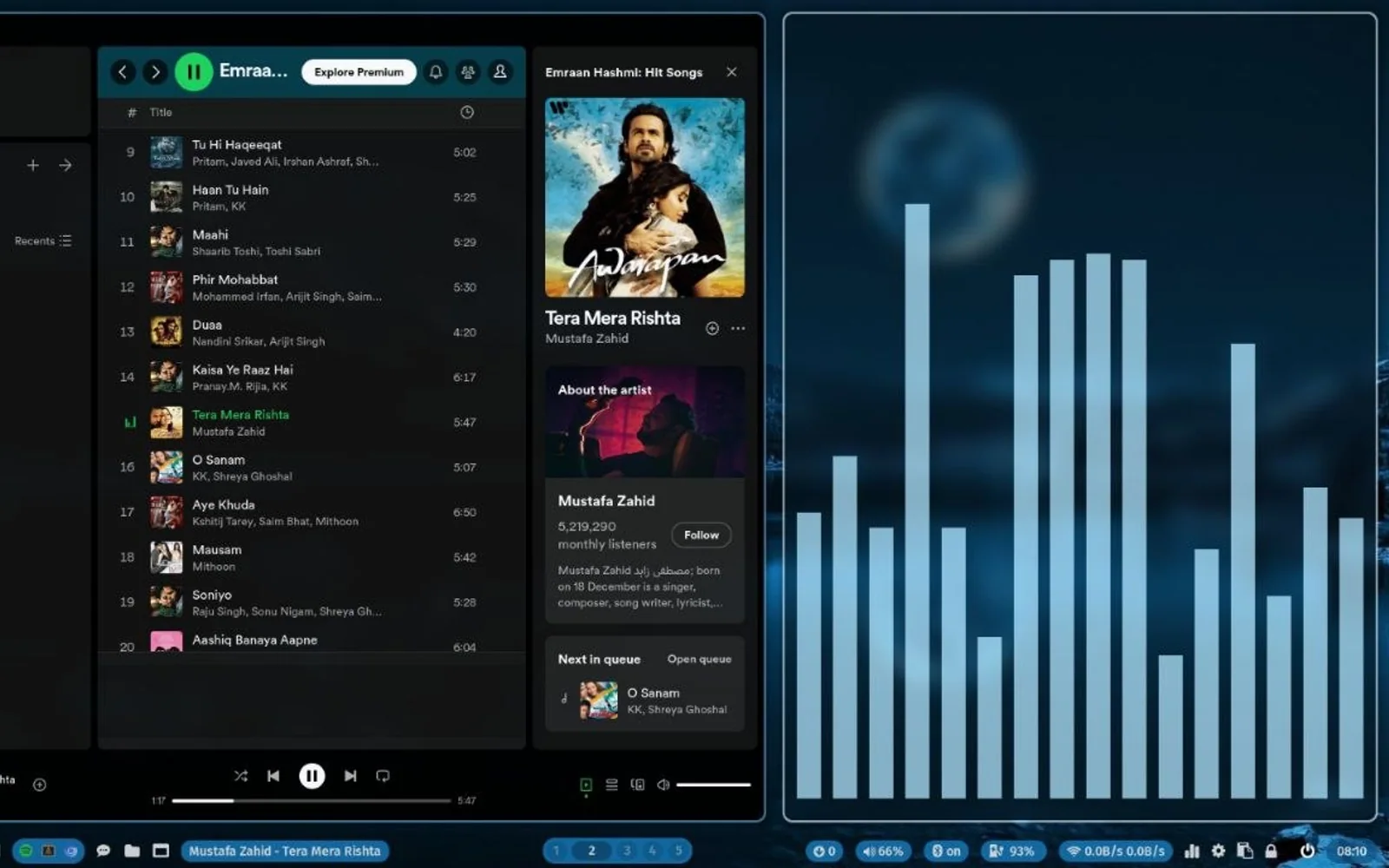
"Ricing" sounds cosmetic. Wallpaper, colour schemes, fonts. That part exists, but it is the smallest part. A full Hyprland rice means every layer of the desktop environment is replaced and configured from scratch.
The status bar (Waybar) is built from scratch: each module — clock, workspace indicators, network, audio, system stats — is a separately configured widget with its own CSS. Nothing is placed by default; you declare what goes where and what it looks like. The widget layer (EWW) handles everything that is not the bar: notification overlays, an app launcher, system dashboards. EWW's declarative Lisp-like syntax means every widget is a function of state, not a drag-dropped component from a settings panel.
The keybinding layer is where a tiling window manager pays off. In Hyprland, every action — moving a window, switching workspaces, launching an application, resizing a split — is a keybind you define. After a week of tuning, I was navigating entirely by muscle memory, without a mouse, without looking at the desktop. Windows go where I tell them. Workspaces are deterministic. The OS stopped being a thing I managed and became infrastructure I operated without thinking about it.
The colour scheme propagates across everything: terminal, editor, status bar, notification popups, EWW widgets. When it is consistent, visual noise disappears. That sounds like aesthetics. Reducing visual noise during a long session is a real concentration variable, not a vanity one. Every pixel on the screen is either earning its place or adding cognitive load.
The AI Chatbot and the Latency Problem
The specific problem this solved was small and real. I kept alt-tabbing to a browser to ask something quick — check a function signature, explain an error message, translate a bash one-liner — and then losing my place in whatever I was doing. Every browser tab switch is a context switch. Open tab, type question, read answer, close tab, remember what you were doing. That round trip compounds across a long session.
I wanted the answer to surface in the workspace, not require leaving it. So I wired a local model (via Ollama) into the desktop with a Python script triggered by a global keybind in Hyprland. A floating EWW window opens on demand, the query goes to the local model, and the response renders inline. No browser. No new tab. No context switch. The model runs locally, so no network latency and no data leaving the machine — which matters when the question is about code from a client project.
The UX principle is simple: the tool should live where the work happens, not the other way around. If getting an answer requires switching to a different application, the cost of asking is artificially high and you ask less. Embedding the tool in the environment lowers the cost to zero.
The Connection to MCP
This predates the MCP server work by about a year, but the instinct is the same. In the rice, the friction was alt-tab friction — the two-second tax of switching applications. In the MCP server work, the friction was copy-paste friction — the cognitive cost of ferrying context from the codebase to the AI and results back. Both are versions of the same problem: the AI's capability is not the bottleneck, the interface is.
The rice was where that principle became concrete before I had a production context to apply it in. You notice it in a personal environment first — where you can move fast and iterate without consequences — and then you recognise the same pattern when it shows up at work. That is the value of building things for yourself: the problems you solve on your own machine teach you to see the same problems in client systems.
Did this resonate?
Love
Fire
Insightful
Clap
Thought-provoking
Comments
Loading comments...